
Masalah:
Apabila saat menjalankan software Autodesk, muncul Error seperti gambar berikut :
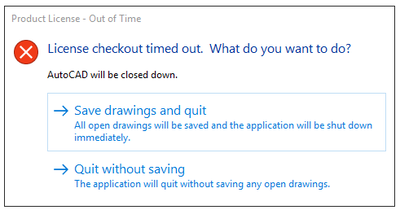
Penyebab:
- Autodesk Licensing Services menggunakan versi lama
- Autodesk Desktop Licensing Services tidak berjalan
- Autodesk Single Sign-on Component rusak
- Software pihak ke-3 tidak kompatibel
- Pengaturan proxy/network
Solusi:
Uninstall dan instal ulang Autodesk Desktop Licensing Service terbaru
- Cara uninstall dan reinstall Autodesk Desktop Licensing Service.
- Cara download dan install Autodesk Desktop Licensing Service
- Cobalah untuk memulai produk Anda lagi.
Perbarui Komponen Identitas Autodesk.
- Unduh dan instal update terbaru untuk:
- Cobalah untuk memulai produk Anda lagi.
Restart atau periksa apakah Autodesk Desktop Licensing Service berjalan
Lihat Cara memeriksa status Autodesk Desktop Licensing Service.
Jika terblokir Antivirus/proxy Tim IT
Silahkan koordinasikan dengan Tim IT Anda.
Klik untuk melihat daftar whitelist URL Autodesk:
Sumber: Autodesk Knowledge Network
